Chameleon Startup Manager

Chameleon Startup Manager

trusted
DOWNLOAD 4.86 MB
3.9  (10 votes)
2.3
This program received 7 awards
Questions & answers
Wiki
Suggest a correction

Video tutorial & screenshots

  • About Window
  • Programs Delay Window
  • Options Window
  • Main Menu
  • Main Window
  • Create Restore Point
  • Setup Window
  • Wizard
  • Main window

Editorial review

Comments

Sean O'Reilly Senior editor

Generally, keeping a close eye on the programs in your startup list will pay off, as it can drastically reduce the time your Windows takes to load. Chameleon Startup Manager offers an effective solution for doing exactly that.

The first thing that impressed me about this application is that it offers to create a system recovery point during its installation.
This means that if you end up disabling the wrong applications, you can always return to the original state of your system.

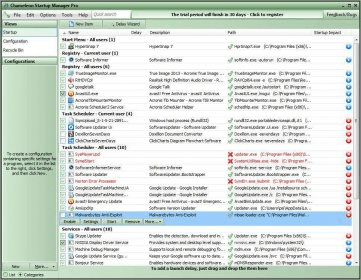
Chameleon Startup Manager displays a list with all the applications present on your Windows startup list. You can also get details such as their location on your hard disk or their memory usage. Furthermore, it categorizes the entries by the users that installed them, or their registry entries.

The thing that I liked the most about this application is that it allows you to delay the launching of any application on your startup list. This is great as it will allow users to optimize the startup of their operating systems. What’s even better, the application can even delay itself, thus offering as many resources as possible to your Windows.

In conclusion, Chameleon Startup Manager is a tool that I recommend. The program is easy-to use, effective and it’s not too expensive, so it has all the qualities it needs to be a viable solution.

Pros

  • Helps you create a system restore point during its installation.
  • Helps you delay the startup of any program.
  • Can displays the startup programs for each Widnows user.
  • It allows you to reduce its own priority while your other startup applications load.

Cons

  • It doesn't allow you to keep a program "banned" from the startup list.
This software was checked for viruses 6 months ago and was found to be clean. Click here to see antivirus report.
trusted
DOWNLOAD 4.86 MB

What's new in version 2.6

Service manager;
Disable new programs automatically;
Select the autorun profile at Windows start-up;
15 types of tasks and 11 available launch conditions;
Autorun programs with a delay period after Windows starts up;
Support for Windows XP x64 edition/2003 x64 edition/Vista
 

Publisher's description

Chameleon Startup Manager is a Windows startup, schedule, service and task manager that accelerates Windows startup, ensures that the operating system is more stable and allows you to run various tasks with the possibility to specify the launch condition. It disables any startup programs and fully controls startup by selecting the programs to be launched, while customizing the startup settings (ie how often and when programs should be launched, etc). Chameleon Startup Manager automatically monitors and reports back if new programs have been added to the startup list, while a manager provides advanced details on running applications. The program also offers full support for the Windows x64 edition and Vista.

Chameleon Startup Manager allows you to specify various tasks to be run (15 types - switch off the computer, start a program, stop Winamp, etc.), launch conditions for them (11 types - if Windows is idle, after a program is started, etc.) and on what days and how many times to run them.

When programs are installed on your computer, different and unnecessary applications are often added to the startup list. There can be dozens of such applications, and their simultaneous operation results in slow startup of your computer and considerably reduces its performance. It is possible to enhance efficiency by removing or temporarily disabling those startup programs that are not required. It is also possible to accelerate and better manage Windows startup by launching required programs at regular intervals or after a specified application, instead of starting them concurrently with the operating system.

Either at Windows startup or specified intervals, Chameleon Startup Manager automatically checks if new programs have been added to the startup list. If it finds such programs, it displays a warning to remove them from the startup list if they are not required.

You can create startup profiles and test different configurations by loading saved profiles.

Leave a comment


loading
Download Software Informer Client